
 v0lp3
3b6aa16c89
feat: improve adf scan with go routines
v0lp3
3b6aa16c89
feat: improve adf scan with go routines
|
4 سال پیش | |
|---|---|---|
| docs | 4 سال پیش | |
| src | 4 سال پیش | |
| README.md | 4 سال پیش | |
| go.mod | 4 سال پیش |
README.md
Brother MFC-J430W WiFi scanner protocol
Reasons
_Brother MFC-J430W has already scanner driver and you can download here_ but that are prebuilt binary (x86/x64) and source code isn't public. This is a problem if you want to use the scanner on ARM architecture, because if you don't have the source code of the driver you can't recompile it. Anyway this should work on every scanner that use brscan4, but I'm not sure.
Scanning protocol
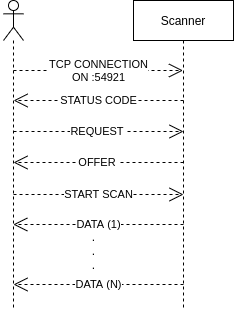
Status codes
When we open a connection with the scanner on port 54921, it respond with his status code:
+OK 200: Ready to use-NG 401: Scanner is busy
Lease
Now we can send a request that specify resolution and color mode, then scanner send to client a offer based on request. I called this part `lease because it recalled me DHCP lease
REQUEST
request := []byte(fmt.Sprintf("\x1bI\nR=%d,%d\nM=%s\n\x80", resolution, resolution, mode))
sendPacket(socket, request)
RESPONSE
300,300,2,209,2480,294,3472
(X,Y)
response[0]response[1]: Image DPIresponse[3]response[5]: Plane dimensions in mmresponse[4]response[6]: Image resolution in px
COLOR MODES
- GRAY64: gray scale image
- CGRAY: color image
- TEXT: low resolution mode, max output (304x434) [not implemented]
RESOLUTIONS
- 100
- 150
- 300
- 600
- 1200
- 2400
Automatic document feeder
If specified it's possible to disable ADF and scan only one page. Omit this if you want use ADF.
if !adf {
  request = []byte("\x1bD\nADF\n\x80")
  sendPacket(socket, request)
  readPacket(socket)
}
Start scan
Now we are ready to send start scan request:
width = mmToPixels(planeWidth, dpiX)
height = mmToPixels(planeHeight, dpiY)

requestFormat := "\x1bX\nR=%v,%v\nM=%s\nC=%s\nJ=MID\nB=50\nN=50\nA=0,0,%d,%d\n\x80"
request = []byte(fmt.Sprintf(requestFormat, dpiX, dpiY, mode, compression, width, height))
- R =
X_DPI,Y_DPI - M =
CGRAYorGRAY64 - C =
JPEGorRLENGTHorNONE - J = MID
- B = 50 (Brightness?)
- N = 50 (Contrast?)
- A = 0,0,
WIDTH,HEIGHT
NOTE: WIDTH and HEIGHT are calculated from plane dimensions because width received from response in lease phase is different from width calculated
func mmToPixels(mm int, dpi int) int {
      return int(float64(mm*dpi) / 25.4)
}
Documentation work in progress...
Compile
git clone https://github.com/v0lp3/mfc-j430w.git
go build -o mfc-j430w mfc-j430w/src/*.go
Usage
./mfc-j430w --help
Output:
Usage of ./mfc-j430w:
  -a string
        IP address of the Brother scanner (default "192.168.0.157")
  -c string
        Color mode of the scan (CGRAY, GRAY64) (default "CGRAY")
  -m    Enable scan of all pages from feeder
  -n string
        Name of the output file (default "scan.jpg")
  -r int
        Resolution of the scan (default 300)
To do
- Implement multi page scan for ADF
- Add flag to output compressed image
Credits
Partially thanks to this