
 v0lp3
5148e1a11a
chore: minor changes color flag description
v0lp3
5148e1a11a
chore: minor changes color flag description
|
4 éve | |
|---|---|---|
| docs | 4 éve | |
| src | 4 éve | |
| README.md | 4 éve | |
| go.mod | 4 éve |
README.md
Brother MFC-J430W protocol wrapper (wifi scanner)
Reasons
Brother MFC-J430W has already scanner driver and you can download here but that are prebuilt binary (x86/x64) and source code isn't public. My problem was that I wanted use scanner in my RPi4 but those driver not works on ARM architecture. In the end I solved this issue throught workaround using a vps... recently I resumed the project and I found a solution (partially thanks to this) and imho I think this is better than any workaround.
Scanner protocol
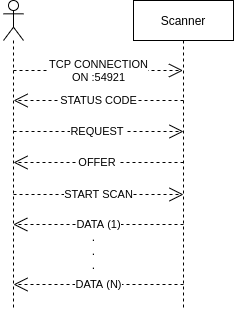
Documentation work in progress....
Compile
git clone https://github.com/v0lp3/mfc-j430w.git
go build -o mfc-j430w mfc-j430w/src/*.go
Usage
./mfc-j430w --help
Output:
Usage of ./mfc-j430w:
  -a string
        IP address of the Brother scanner (default "192.168.0.157")
  -c string
        Color mode of the scan (CGRAY, GRAY64) (default "CGRAY")
  -m    Enable scan of all pages from feeder
  -n string
        Name of the output file (default "scan.jpg")
  -r int
        Resolution of the scan (default 300)
To do
- Integrate with SANE
- Implement multi page scan for ADF
- Add flag to output compressed image
- Add flag to customize brightness and contrast